In the world of technology, our laptops are often pushed to their limits, whether we’re gaming, running demanding software, or simply multitasking through our day. But there’s a silent enemy always at play: heat. Excessive heat isn’t just uncomfortable; it’s a direct threat to your laptop’s performance and longevity. That’s where an Antec Laptop Cooler steps in, offering a vital line of defense. As a thermal engineer with over a decade in this field and the content lead for Tselk.com, I’ve seen firsthand how crucial effective cooling solutions are. Antec, a name synonymous with PC components, has historically delivered robust cooling solutions that keep your precious hardware running smoothly, extending its life, and maintaining peak performance.
Why Your Laptop Craves an Antec Laptop Cooler
Imagine your laptop struggling to breathe, its internal fans whirring furiously, yet the chassis feels like a hot plate. This isn’t just an inconvenience; it’s a symptom of a deeper problem. When your laptop overheats, its internal components, particularly the CPU and GPU, throttle their performance to prevent damage. This means slower speeds, frustrating lag, and even unexpected shutdowns. Over time, sustained high temperatures can permanently shorten the lifespan of your battery, hard drive, and other critical parts.
Common culprits for laptop overheating include:
- Blocked Vents: Placing your laptop on soft surfaces like beds, blankets, or even your lap can block essential air intake and exhaust vents.
- Dust Buildup: Over months and years, dust accumulates inside your laptop, acting as an insulating layer and impeding airflow through heatsinks and fans.
- Demanding Tasks: Gaming, video editing, 3D rendering, and extensive multitasking naturally generate more heat than casual browsing.
- Poor Ambient Conditions: Using your laptop in a hot room or direct sunlight exacerbates heat issues.
An Antec laptop cooler, with its active cooling design, tackles these issues head-on. By elevating your laptop and introducing a steady stream of cooler air to its underside, it enhances natural convection and actively dissipates heat, effectively reducing internal temperatures and preventing thermal throttling. This proactive approach safeguards your investment and ensures a smoother, more responsive computing experience.
Exploring the Legacy: Key Antec Laptop Cooler Models
Antec has innovated several laptop cooler designs over the years, each addressing different user needs. While some models represent their earlier contributions, their underlying principles of effective cooling remain relevant.
The Original Antec Notebook Cooler
|
Our Picks for the Best Laptop Cooler in 2026
As an Amazon Associate I earn from qualifying purchases.
|
||
| Num | Product | Action |
|---|---|---|
| 1 | ChillCore Laptop Cooling Pad, RGB Lights Laptop Cooler 9 Fans for 15.6-19.3 Inch Laptops, Gaming Laptop Fan Cooling Pad with 8 Height Stands, 2 USB Ports - A21 Blue |

|
| 2 | AICHESON Laptop Cooling Pad 5 Fans Up to 17.3 Inch Heavy Notebook Cooler, Blue LED Lights, 2 USB Ports, S035, Blue-5fans |
|
| 3 | Laptop Cooling Pad, Laptop Cooler 6 Quiet Fans for 12\"-17\" Laptops, Gaming Laptop Fan Cooling Pad with 5 Height Adjustable, Slim Portable USB Powered, 2 USB Ports & Phone Holder |
|
| 4 | llano V12 Laptop Cooling Pad, Gaming Laptop Cooler Stand with 5.5inch Powerful Turbo Fan, Adjustable Speed, Touch Control, 3-Port USB A, for Fast Cooling Laptop 15.6-19in, Black (No RGB) |
|
| 5 | havit HV-F2056 15.6\"-17\" Laptop Cooler Cooling Pad - Slim Portable USB Powered (3 Fans), Black/Blue |
|
| 6 | Kootek Laptop Cooling Pad, Laptop Cooler with 5 Quiet Fans for 12\"-17\" Computer PC Notebook Gaming Laptop Fan, Height Adjustable Laptop Cooling Stand Laptop Accessories, Blue |
|
| 7 | Razer Laptop Cooling Pad: Adaptive Smart - Intelligent Fan Control - Airtight Pressure Chamber - Fits Most Laptops & Macbooks 14” to 18\" - Preset & Custom Fan Curves - 3 Port USB Type A - Chroma RGB |
|
| 8 | Laptop Cooling Pad, Gaming Laptop Cooler for 13-19 Inch Laptops, RGB Lights Laptop Fan Cooling Pad with 3 Height Adjustable and 3 USB Ports, 4.72 Inch Large Turbo Fan, Max 3500RPM |
|
| 9 | KeiBn Laptop Cooling Pad, Gaming Laptop Cooler 2 Fans for 10-15.6 Inch Laptops, 5 Height Stands, 2 USB Ports (S039) |
|
| 10 | llano V12 RGB Laptop Cooling Pad, Gaming Laptop Cooler with 5.5 Inch Powerful Turbofan, Fast Cooling Laptop 15.6-21in, Adjustable Speed, Touch Control, LCD Screen, Black (RGB) |
|
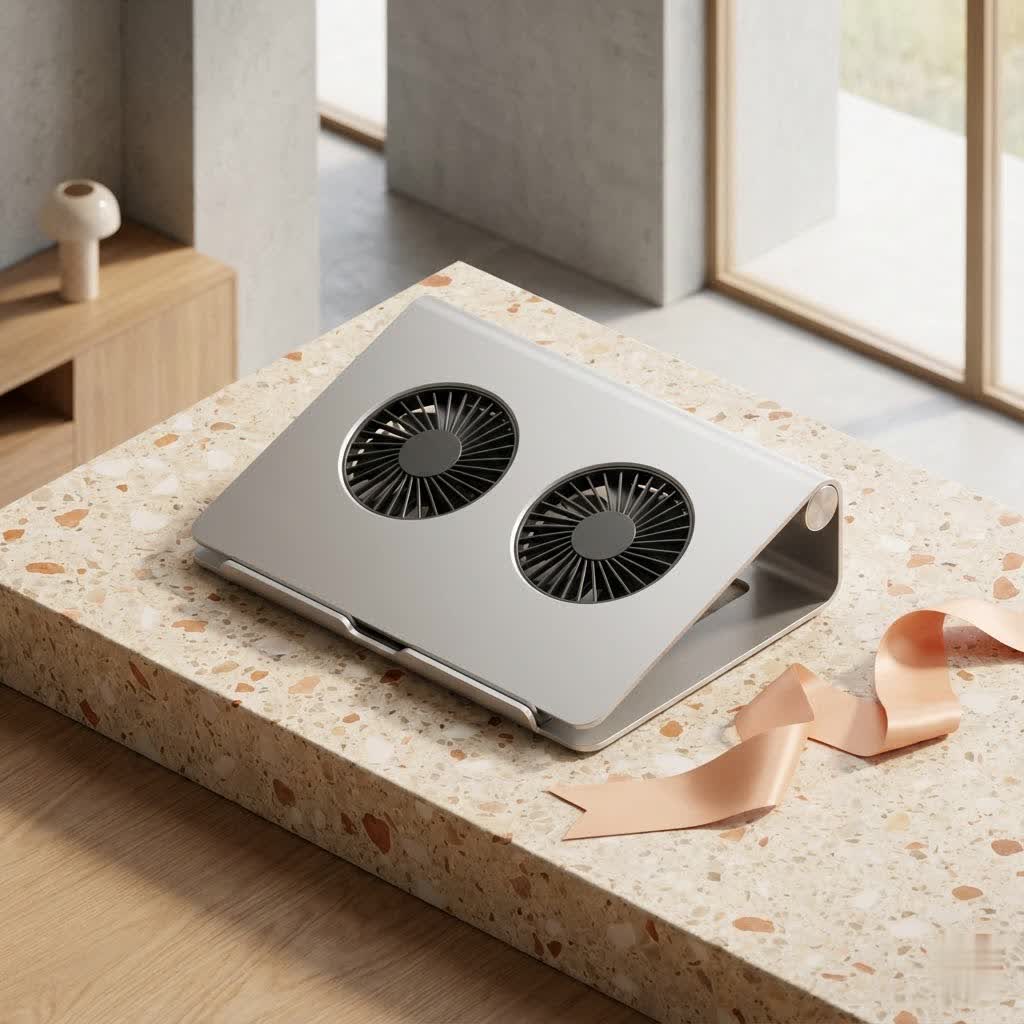
This pioneering model set a benchmark for active cooling. It featured dual USB-powered fans designed to actively draw hot air away from the laptop’s base. Users appreciated its ability to significantly reduce CPU temperatures, making intense workloads more manageable. Its design aimed for portability, fitting into most mid-sized laptop bags, though some noted its proprietary USB power cable as a minor drawback. It was a clear step up from passive cooling pads, demonstrating the power of forced airflow.
Antec Notebook Cooler 200: Big Fan, Big Performance
For those seeking more substantial cooling, the Antec Notebook Cooler 200 made a statement with its massive 200mm fan. This “Big Boy” fan, housed within a sturdy, predominantly plastic frame with a metal mesh grill, was engineered to provide robust airflow. It was particularly popular among gamers whose high-performance machines tended to run hot. The Notebook Cooler 200 also introduced stylish blue LED illumination and two-speed fan settings, allowing users to balance cooling performance with noise levels. While not the most portable due to its size, it excelled as a stationary cooling solution for gaming rigs and workstations.
Antec Notebook Cooler S and “To Go”: Portable Powerhouses
Recognizing the need for on-the-go cooling, Antec introduced more compact and portable options like the Antec Notebook Cooler S and the “Notebook Cooler To Go.” These models emphasized a lightweight design with dual fans, allowing users to easily transport them with their laptops. The “To Go” model, for example, offered two distinct fan modes (normal and hard) for adjustable cooling and noise. Many of these portable designs also integrated an extra USB pass-through port, a thoughtful addition that prevented users from losing a valuable USB slot on their laptop. These coolers were designed to be partially placed under the laptop, drawing air from above and propelling it beneath the machine, making them versatile for various setups.
Antec Basic Notebook Cooler: Simplicity Meets Effectiveness
The Antec Basic Notebook Cooler focused on fundamental cooling and ergonomics. Constructed with aluminum, it promoted natural airflow through perforated holes and elevated the laptop to an ergonomic angle. This model catered to users who desired a silent, passive cooling solution combined with improved typing comfort and reduced eye strain. Its foldable, slim design made it an excellent travel companion, highlighting that sometimes, the simplest solutions are the most elegant.
Key Features to Consider in Any Antec Laptop Cooler
When evaluating an Antec laptop cooler, or any cooling solution, several features stand out as crucial for maximizing its effectiveness and your user experience:
- Fan Size and Quantity: Larger fans (like the 200mm in the Antec Notebook Cooler 200) generally move more air at lower RPMs, leading to quieter operation. Multiple smaller fans can target specific hot spots.
- Adjustable Fan Speeds: The ability to switch between modes (e.g., quiet for light use, high-performance for intense tasks) is invaluable for balancing cooling and noise.
- Ergonomics and Design: Look for coolers that elevate your laptop to a comfortable viewing and typing angle. This not only aids cooling by improving airflow but also reduces strain on your wrists and neck.
- Portability vs. Stationary Use: Consider your primary usage. Compact, lightweight models are great for travel, while larger, more robust coolers are ideal for a fixed desk setup.
- USB Pass-Through Ports: A significant convenience feature, this allows you to power the cooler without sacrificing one of your laptop’s precious USB ports.
- Build Quality and Materials: Durable construction, whether from quality plastics or aluminum, ensures the cooler can withstand daily use. Aluminum, in particular, aids in heat dissipation.
Choosing the Right Antec Laptop Cooler for Your Needs
Selecting the perfect Antec laptop cooler really comes down to how you use your laptop. There’s no one-size-fits-all, but by considering your typical habits, you can find a solution that truly enhances your computing experience.
For the Casual User and Everyday Tasks
If your laptop mainly handles browsing, word processing, and streaming, you might not generate extreme heat. For you, an Antec Basic Notebook Cooler or a more compact “To Go” model might be ideal. These provide adequate airflow, elevate your machine for better ergonomics, and are often lightweight and portable. They prevent the slow, insidious buildup of heat that can degrade components over time, even with lighter use.
For Gamers and Heavy Users
If your laptop is a powerhouse for gaming, video editing, or graphic design, then you know the meaning of “laptop furnace.” These activities push your CPU and GPU to their limits, generating significant heat. A cooler like the Antec Notebook Cooler 200, with its large, powerful fan, is designed for this intensity. It provides the robust active cooling needed to maintain stable frame rates and prevent performance drops during those critical moments. Look for models that provide maximum airflow and effective heat exhaust.
For Desktop Dominance vs. On-the-Go Adventures
Do you predominantly use your laptop at a desk, or is it your constant travel companion? If your laptop rarely leaves your workspace, a larger, more powerful Antec laptop cooler that offers superior cooling without prioritizing extreme portability could be your best bet. These often provide more stable platforms and more extensive cooling surfaces.
Conversely, if you’re constantly on the move, an Antec Notebook Cooler S or “To Go” offers the perfect balance. Their compact, lightweight designs mean they won’t weigh down your bag, and their effective cooling capabilities ensure your laptop stays comfortable even when you’re working from a coffee shop or airport lounge.
Laptop Size Compatibility
Always check the cooler’s specifications to ensure it matches your laptop’s size. While many coolers accommodate a range of laptop sizes, a perfect fit ensures optimal airflow and stability. An Antec laptop cooler should provide a stable platform for your machine without it wobbling or overflowing the edges.
Budget Considerations
Antec has offered coolers across various price points. Determine your budget, but remember that investing in a good quality cooler can save you money in the long run by extending your laptop’s life and preventing costly repairs. Sometimes, a slightly higher initial investment yields significant returns in terms of performance and peace of mind.
Maximizing the Performance of Your Antec Laptop Cooler
Owning an Antec laptop cooler is a fantastic first step, but a little extra care can unlock its full potential and ensure your laptop stays frosty.
The Right Placement Matters
Simply placing your laptop on the cooler isn’t always enough. Ensure your laptop’s intake vents (usually on the bottom) align with the cooler’s fans for maximum effect. Position the cooler on a hard, flat surface to allow unimpeded airflow. Avoid using it on soft furnishings like beds or sofas, as these can block the cooler’s own air intake.
Keep Those Vents Clear
Even with a cooler, your laptop’s internal vents can get dusty. Regularly clean your laptop’s vents with compressed air to remove accumulated dust. This works in conjunction with your Antec laptop cooler to ensure maximum heat extraction. A clean laptop and a dedicated cooler create an unbeatable thermal duo.
Software Side of Cooling
Beyond hardware, leverage software solutions. Monitor your CPU and GPU temperatures using utility programs. If your laptop has performance modes, consider using a balanced setting when not performing demanding tasks to reduce unnecessary heat generation. Some laptops also allow manual fan control, which can be adjusted in conjunction with your external cooler.
Regular Cleaning of Your Cooler
Your Antec laptop cooler works hard, and its fans can also accumulate dust. Periodically clean the cooler’s fans and surfaces to maintain optimal airflow. A can of compressed air or a soft brush usually does the trick. A clean cooler is an efficient cooler.
Expert Insights on Antec Laptop Cooling
“Antec has always understood that effective thermal management isn’t about brute force; it’s about intelligent design and airflow dynamics,” shares Dr. Helena Ramirez, a veteran thermal engineer and my esteemed colleague. “Their notebook coolers, from the earliest dual-fan models to the portable ‘To Go’ series, showcased a commitment to providing tangible temperature reductions. While the market constantly evolves, the principles they championed – active airflow, ergonomic elevation, and practical features like USB pass-through – remain cornerstones of excellent laptop cooling design today.” It’s this dedication to solving real-world heat problems that cemented Antec’s place in cooling history.
Frequently Asked Questions About Antec Laptop Coolers
Are Antec laptop coolers still available or relevant today?
While Antec has evolved its product lines over the years, many of their core laptop cooler designs, or very similar concepts, remain highly relevant for effective laptop cooling. The fundamental physics of heat dissipation haven’t changed, so their fan-based solutions still offer significant benefits. Newer models might exist under different branding or updated designs.
How do Antec coolers compare to other brands?
Historically, Antec laptop coolers were praised for their robust cooling performance and build quality, especially for their time. Their larger fans often contributed to quieter operation compared to some competitors. While the market now features many brands, Antec’s focus on essential cooling features and ergonomic design holds up as a strong foundation.
Can an Antec laptop cooler extend my laptop’s life?
Absolutely. By preventing your laptop from consistently running at high temperatures, an Antec laptop cooler significantly reduces thermal stress on components like the CPU, GPU, and battery. This directly contributes to a longer, healthier lifespan for your device and reduces the risk of premature hardware failure.
Do I need a laptop cooler if my laptop isn’t noticeably hot?
Even if your laptop doesn’t feel overtly hot, internal temperatures can still be elevated, subtly impacting performance and component longevity. An Antec laptop cooler acts as a preventative measure, ensuring optimal temperatures during prolonged use and demanding tasks, thus maintaining peak efficiency and extending your laptop’s life proactively.
How loud are Antec laptop coolers?
The noise level of an Antec laptop cooler depends on the specific model and fan speed. Models like the Antec Notebook Cooler 200 with its large 200mm fan, or the “To Go” series with adjustable fan speeds, were generally designed to be relatively quiet, especially at lower settings. The goal is effective cooling without excessive acoustic disturbance, and Antec often aimed for a balance between the two.
Conclusion: Embrace the Cool with an Antec Laptop Cooler
From intense gaming sessions to crucial work deadlines, your laptop is an indispensable tool. But the silent threat of overheating can undermine its capabilities and cut short its life. Investing in an Antec laptop cooler isn’t just buying an accessory; it’s investing in the longevity, performance, and stability of your most important computing device. Antec’s legacy in laptop cooling, with its various innovative designs, has consistently offered effective solutions for managing laptop thermals.
By choosing the right Antec laptop cooler for your needs and maintaining it properly, you can ensure your machine runs cooler, quieter, and more efficiently. So, take control of your laptop’s thermal health today. Your laptop – and your peace of mind – will thank you for it. Stay cool, stay productive, and keep those temperatures down!
